
Embed widgets Pro
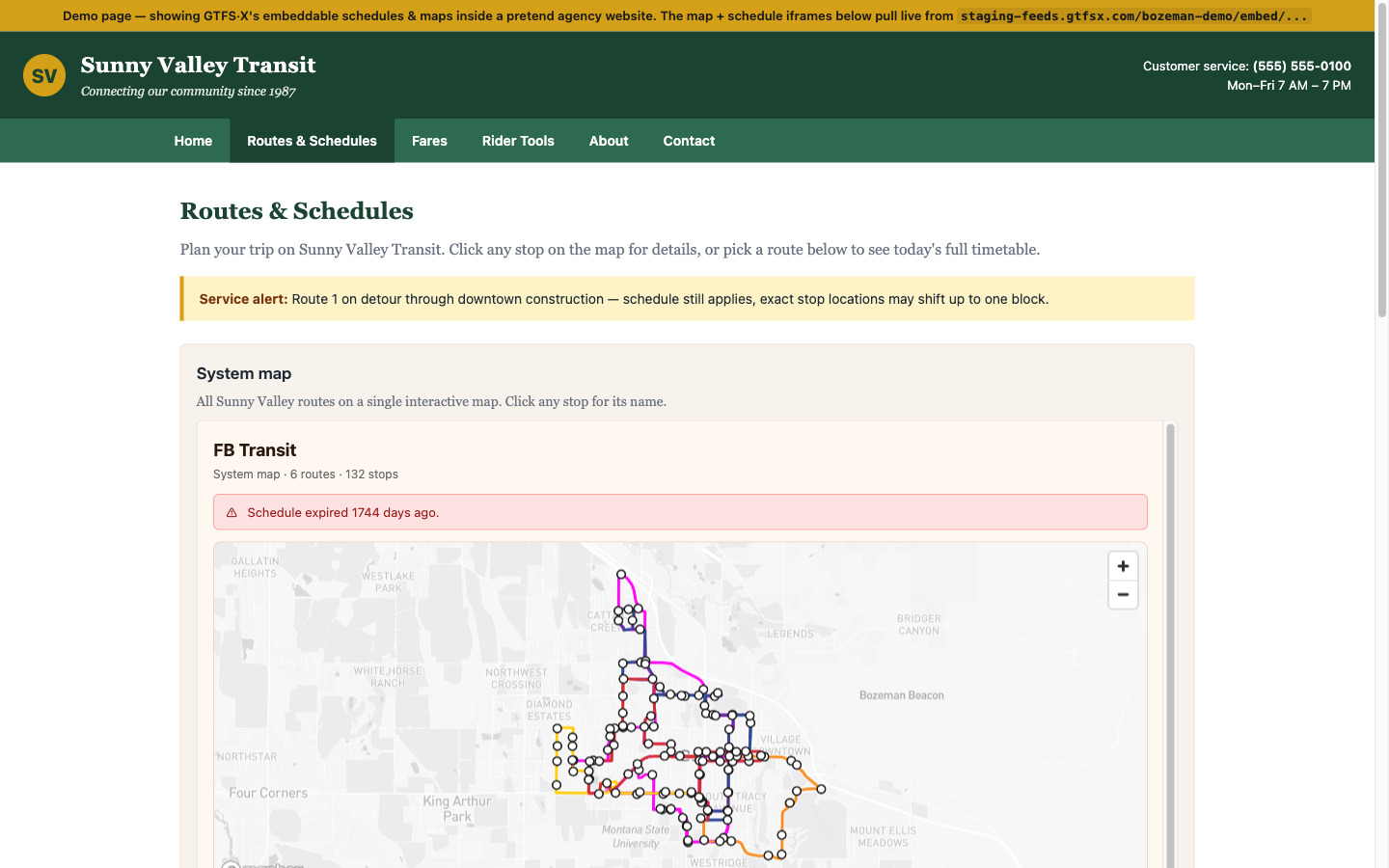
Drop an interactive system map or per-route schedule into your agency's existing website with a single <iframe>. The widget reads directly from your published GTFS feed and updates the next time you publish — so the website stops drifting away from the bus.
What it is
A published GTFS·X feed exposes three iframe-friendly widgets:
- System map — interactive Mapbox map showing every route and stop, with a clickable route list.
- Route schedule — schedule table for a single route, with a tab to switch service patterns (Weekday / Saturday / etc.) and a per-route map.
- Stop departures — name, location, and upcoming arrivals for a single stop. (Less commonly used; covered below.)
Each widget is a server-rendered page that responds to the iframe's width and embeds the feed data — no JavaScript snippet to install, no separate API key, no CMS plugin. Paste an iframe tag, you're done.
When to use it
- The agency already has a website (WordPress, Squarespace, county-CMS, hand-rolled) and needs to surface the schedule there without rebuilding the whole site.
- A rider-facing landing page on a partner property — a downtown business association, a university transportation page, a chamber-of-commerce visitor guide — wants to show the routes that serve them.
- Internal stakeholder pages that need to show the current schedule in context (a board portal, a project page for a service-change proposal). The iframe always reflects the latest published feed.
Embed codes
Replace your-slug below with your project slug, and 1234 with a real route ID or stop ID from your feed.
System map
<iframe
  src="https://feeds.gtfsx.com/your-slug/embed/system-map"
  width="100%"
  height="600"
  loading="lazy"
  title="Your Agency system map">
</iframe>
Single route
<iframe
  src="https://feeds.gtfsx.com/your-slug/embed/route/1234"
  width="100%"
  height="700"
  loading="lazy"
  title="Route 1234 schedule">
</iframe>
Single stop
<iframe
  src="https://feeds.gtfsx.com/your-slug/embed/stop/1234"
  width="100%"
  height="500"
  loading="lazy"
  title="Stop 1234 departures">
</iframe>
For real working examples, see the embed demo — it pulls live from the published Sunny Valley Transit feed (feeds.gtfsx.com/svt-demo/) and is the source of the iframe snippets above.
Getting the snippets from the editor
You don't have to hand-construct the iframe tags. In the editor, click Embed in the footer (next to Timetable, Service Summary, Validation, Snapshots, Share & Publish). The Embed tab lists:
- The system-map snippet with a one-click Copy button.
- One snippet per route, sorted by short name, each with its own Copy button.
- A brand-color picker that applies to every embed under this feed (active tabs, accent colors).
The widgets are only available once the feed is published — see Hosted publishing if the Embed tab is hidden or empty.
Customization
- Brand color — a single hex color set per project, applied to every widget. Defaults to the GTFS·X coral.
- Width and height — iframe attributes. Use
width="100%"for a responsive embed; pick a fixed height (~500–700px works for most routes; long schedules will scroll internally). - Service pre-selection — append
?service=<service_id>to the route URL to pre-select a specific service pattern (otherwise the widget picks today's service automatically). - Title attribute — set
title="…"on the iframe for accessibility. The widgets don't auto-set this because they don't know what page they're being embedded into.
Gotchas
- Map height matters. The system-map widget assumes ~500px of vertical room. At <300px the map becomes hard to interact with. Pick a height that gives riders enough room to pan and zoom.
- Schedules don't paginate. A route with 200 trips renders 200 rows — the iframe will get an internal scrollbar. For high-frequency service, consider switching the GTFS representation to
frequencies.txt. - CSP / sandbox attributes. If your CMS injects an aggressive
sandbox=""on iframes, the widget's interactive map won't load. Allowallow-scripts allow-same-originat minimum. - Cross-origin iframes are isolated. The widget can't access cookies or storage on the host page, and the host page can't directly call into the widget. If you need that level of integration, hit the underlying GTFS ZIP and render your own UI.
- No realtime data. Widgets reflect the static GTFS schedule. GTFS-Realtime updates (arrivals, alerts, vehicle positions) aren't surfaced. For real-time arrivals at a stop, use a separate tool that consumes your GTFS-RT feed.
See also
- Hosted publishing — required for embeds to work.
- Rider mini-site — same data, full-page rather than embedded.
- Embed demo page — a live example of the widgets in a pretend agency site.