
Rider mini-site Pro
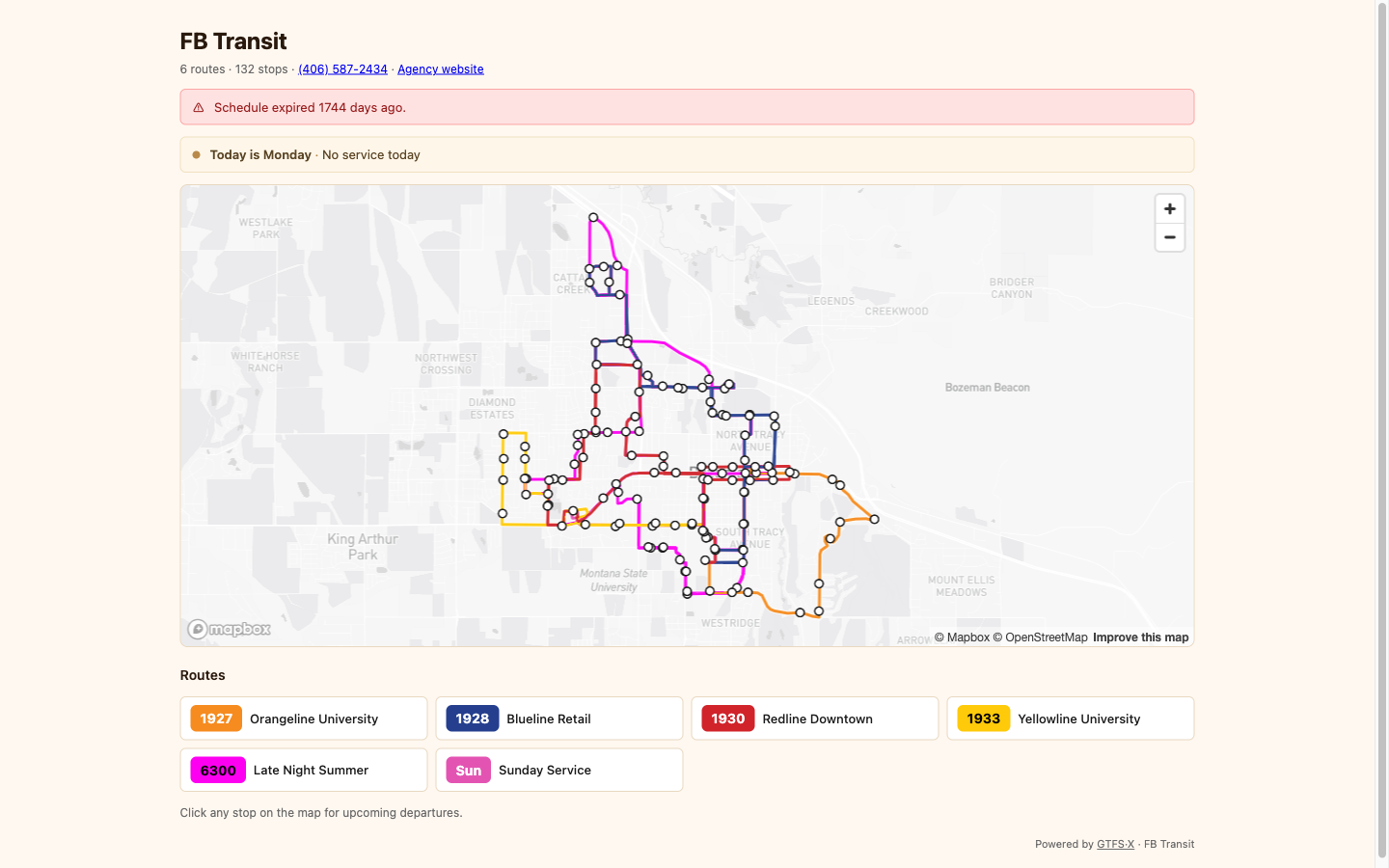
Every published GTFS·X feed gets an auto-generated rider-facing landing page at feeds.gtfsx.com/<slug>/. System map, today's service, route list, contact info — the essentials a rider needs to ride. No template work, no separate CMS, no extra invoice. See it live →
What it is
For most small and rural agencies, "the website" is an afterthought — a static page on the county or operator site that lists a phone number and a PDF of the schedule. Riders deserve better; staff don't have time. The mini-site is the cheapest possible escape from that bind: as long as you maintain the GTFS feed in GTFS·X and click Publish, the rider-facing page stays current automatically.
What's on it
- Agency name and contact. Pulled from
agency.txt— name, public URL, phone. If the URL is set, it's linked from the page header. - Service status banner. "Today is Monday — Weekday service" / "Today is Sunday — Sunday service" / "Today is Thursday — No service today." Reads from the calendar to tell riders what's running before they look at the map.
- Feed expiry warning. If
feed_info.feed_end_dateis within 14 days, the page surfaces a banner telling riders the schedule is about to expire. If it's already past, the banner reports how many days ago. (Surface area for fixing this is the editor's Calendars panel.) - System map. An interactive Mapbox map showing every route and stop, color-coded from the GTFS route colors. Riders can pan, zoom, and click a stop to see schedule details.
- Route list. Each route as a clickable pill with the route's short name, long name, and color. Clicking opens the per-route detail (map + schedule for that route alone).
- Schedule view. Per-route schedule tables for each service pattern, with a tab to switch between (Weekday / Saturday / Sunday / holiday calendar). Generated server-side from
stop_times.txt. - Open Graph + structured data. Linking the mini-site from social media renders a clean preview card (agency name, route count, stop count). Search engines see schema.org/TransitFeed markup for indexing.
Branding
The mini-site supports light branding, set on the project in the editor's Share & Publish tab:
- Brand color — a single hex value. Used for the page accent color (active tabs, links, button backgrounds). Defaults to the GTFS·X coral if unset.
- Logo — an organization logo URL (Team plan and above). Renders next to the agency name in the page header.
What isn't supported today:
- Custom CSS or HTML. The template is fixed; brand color and logo are the only knobs.
- Custom domain (CNAME). The mini-site serves from
feeds.gtfsx.com/<slug>/. If you want a vanity URL, link or redirect from your own site. - Service alerts. The site reads the feed only; GTFS-Realtime alerts aren't surfaced. For a detour or disruption announcement, you'll still need a separate channel (Twitter, agency website banner, signage).
- Pagination on very long schedules. A 200-trip route renders 200 rows; if you have an extreme-frequency timetable, consider switching to a frequency-based representation in
frequencies.txt.
How to publish a mini-site
You don't publish a mini-site directly — you publish a feed, and the mini-site is generated automatically. See Hosted publishing for the publish flow. The URL pattern is always:
- Mini-site:
https://feeds.gtfsx.com/<slug>/ - Per-route page:
https://feeds.gtfsx.com/<slug>/route/<route_id> - Underlying GTFS:
https://feeds.gtfsx.com/<slug>/gtfs.zip
Who it isn't for
The mini-site is intentionally minimal. If your agency needs a fully designed website with riders' stories, board pages, project pages, ADA accessibility docs, news posts, and a press kit, the mini-site doesn't replace that — it's a rider-data surface, not a full content platform. Use the mini-site as the live-schedule canonical, and link to it from a richer site elsewhere.
See also
- Hosted publishing — how feeds get on
feeds.gtfsx.comin the first place. - Embed widgets — the same data as iframes you can drop into your own site.
- Agency setup — where the agency name, URL, and phone come from.
- Service calendars — what drives the "today is…" banner.