
What is GTFS-Flex?
GTFS-Flex is an optional extension to the baseline GTFS specification that adds support for demand-responsive transit (microtransit, dial-a-ride, deviated fixed-route, and any other service where vehicles don't follow a strictly fixed route or strictly fixed schedule). It was formally adopted into the GTFS spec in March 2024. It is not required: fixed-route-only agencies don't need it. But without GTFS-Flex, demand-responsive service is invisible to trip planners, even if you're already running it.
Why the base spec isn't enough
The original GTFS spec assumes a vehicle leaves stop A at 8:00, arrives at stop B at 8:07, and so on: a deterministic sequence of fixed stops at fixed times. That model breaks down for any service where:
- The vehicle goes wherever riders book it within a defined zone (microtransit, dial-a-ride).
- Pickups and drop-offs can happen anywhere along a corridor, not just at marked stops.
- The route follows a fixed path but will deviate on request (deviated fixed-route).
- Riders need to book in advance (the trip doesn't run unless someone calls).
GTFS-Flex extends the spec to cover all of these cases without breaking compatibility with consumers that only understand fixed-route GTFS.
What GTFS-Flex adds
Service area zones (locations.geojson)
Instead of (or in addition to) point stops, you define polygon zones using GeoJSON. Riders can request pickup and drop-off anywhere within the zone. This is how microtransit and dial-a-ride service areas are represented.
Pickup/drop-off windows
Instead of a fixed arrival time, a flex stop or zone has a pickup window and a drop-off window (for example, "pickups available between 8:00 and 9:00 AM, drop-off within 30 minutes"). Trip planners can then surface this as a time range rather than a single departure time.
Continuous pickup and drop-off
For corridor-style flex service, you can mark a route segment as supporting continuous pickup or drop-off, meaning the vehicle will stop anywhere along that segment, not just at scheduled stops.
Booking rules (booking_rules.txt)
This is often the most important file in a flex feed. Booking rules tell riders (and trip planners) how to actually request a trip:
- Booking type: real-time, same-day, or prior-day.
- Advance notice: the minimum lead time required, e.g. "book at least 60 minutes in advance" or "book by 5 PM the day before."
- Maximum advance window: how far in the future bookings are accepted.
- Booking contact: phone number, URL, or app deep link.
- Message text: human-readable instructions shown to riders ("Call (555) 555-1234 at least one hour before your desired pickup").
Who needs GTFS-Flex?
- Microtransit operators: Via, Spare, RideCo, and similar on-demand zone services.
- Rural transit agencies running dial-a-ride or deviated fixed-route service in low-density areas.
- Paratransit services that want to be visible in mainstream trip planners.
- Senior and ADA service with advance-booking requirements.
- Hybrid systems mixing fixed-route trunk service with first-mile/last-mile flex zones.
Why publish a flex feed?
The core problem GTFS-Flex solves is a discovery gap. Demand-responsive services (rural dial-a-ride, microtransit zones, call-ahead connectors) are often the hardest services for riders to find out about. They're buried in PDFs, agency websites, or word of mouth. A rider planning a trip on Google Maps or the Transit app simply won't see them.
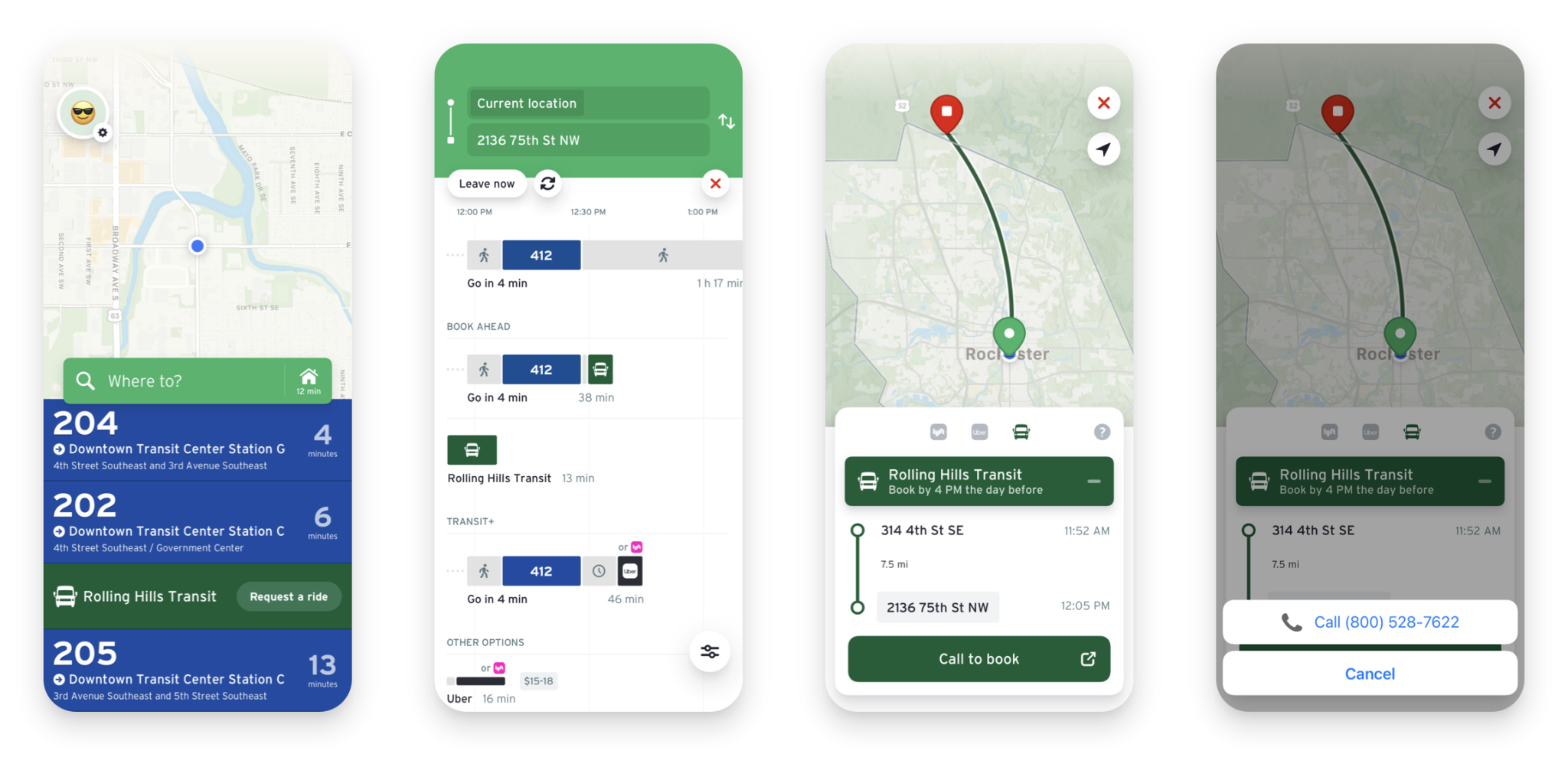
Publishing GTFS-Flex means riders find your service through the same channels they use to plan any trip. The Transit app and OpenTripPlanner-based planners both support GTFS-Flex natively. Once you publish a flex feed, your service surfaces in real consumer apps alongside fixed-route results. For rural agencies in particular, this is often the single highest-leverage thing you can do for ridership: the service already exists and is already funded; GTFS-Flex just makes it visible. As Arizona DOT's guidance on GTFS-Flex puts it, riders can now see services publishing GTFS Flex in the Transit app and OpenTripPlanner … this allows riders to find and utilize transit services that they may not have known were available.
(ADOT GTFS-Flex guide, September 2025)
From an agency perspective, GTFS-Flex also means getting credit (in NTD reporting, grant applications, and Title VI analysis) for service you already operate. A flex feed turns a service that looks invisible in automated tools into a service with a documented coverage area and booking workflow.
What tooling do you need?
Because GTFS-Flex is an extension (GeoJSON service areas, booking_rules.txt, extended stop_times.txt columns), authoring it requires an editing tool that supports the extension. National RTAP's free GTFS Builder does not support GTFS-Flex. If your agency uses it for fixed-route and needs to add flex, you'll need a tool that can author Flex zones, stop groups, and booking rules. See our GTFS·X vs. National RTAP GTFS Builder comparison for a full breakdown of where each tool fits.
Building a flex feed in GTFS·X
GTFS·X has first-class support for GTFS-Flex. You can draw polygon zones directly on the map, configure pickup and drop-off windows, mark route segments as continuous pickup, and define a full set of booking rules per zone or per trip. Mixed feeds (fixed-route plus flex) are fully supported. See Authoring GTFS-Flex with GTFS·X for the step-by-step workflow.
Spec references & further reading
- The official GTFS-Flex specification is maintained at gtfs.org/community/extensions/flex.
- The base GTFS spec is at gtfs.org; see our plain-English overview.
- Arizona DOT GTFS-Flex guide (PDF): a concise state-DOT overview of GTFS-Flex, including required files and getting-started steps.
See also
- MnDOT + GTFS-Flex: bringing rural riders into the fold (Transit app blog): a real-world case study of statewide GTFS-Flex rollout for rural Minnesota agencies, including how Rolling Hills Transit's service was made discoverable in the Transit app.
- Authoring GTFS-Flex with GTFS·X: zones, booking rules, and export mechanics in the editor.
- How to publish a GTFS feed: Mobility Database registration, hosted-URL options, and what tends to break.
- GTFS·X vs. National RTAP GTFS Builder: Flex support, map editing, and which tool fits which agency.
- GTFS·X vs. Spare GTFS-Flex Builder: when a microtransit-only builder is the right fit and when it isn't.