
Docs · Publishing & distribution · Draft & review links
Draft & review links Pro
Hand a stakeholder a working copy of your feed before it goes live. A draft link is an unguessable, time-limited URL to a specific snapshot's GTFS ZIP — perfect for review by a colleague, a consultant, or a downstream consumer who wants to test the feed before you publish it to the world.
What it is
Publishing puts your feed at a permanent, public, catalog-registered URL. That's the wrong tool for "can you check this before it's live?" A draft link fills that gap: a private URL you can share for review, with none of the permanence or discoverability of a real publish. It serves a frozen snapshot, so what your reviewer downloads doesn't shift under them while you keep editing.
When to use it
- Sending a revised feed to a state DOT coordinator or a consultant for sign-off before publishing.
- Letting a downstream developer or trip-planner integrator test against real data ahead of go-live.
- Sharing a proposed service change internally without exposing it on your public feed URL.
How to use it in GTFS·X
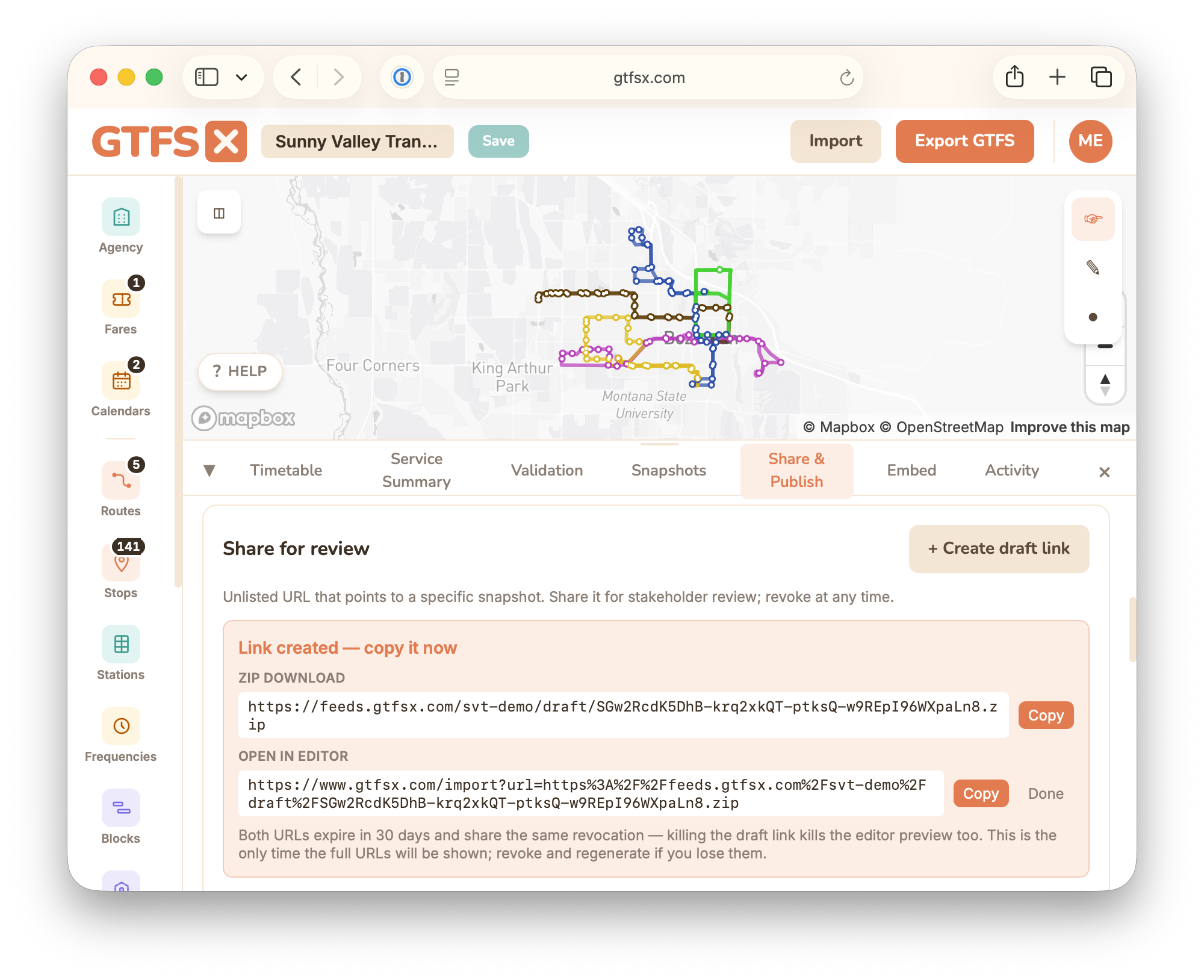
- Open the feed and go to the Share & Publish tab in the bottom panel, then the Share for review section.
- Choose + Create draft link. GTFS·X mints a private link pinned to the current snapshot and shows two URLs — this is the only time the full URLs are displayed, so copy them now:
- a direct ZIP download (
feeds.gtfsx.com/<slug>/draft/<token>.zip) for a reviewer or a downstream consumer; - an open-in-editor link (
gtfsx.com/import?url=…) that loads the snapshot straight into the editor for a colleague.
- a direct ZIP download (
- Copy whichever fits and send it. No GTFS·X account is required to download the ZIP.
- When the review is done, revoke the link (or let it expire). Both URLs share one revocation — killing the draft link kills the open-in-editor preview too.
How it stays private
- Unguessable token. The link carries a 192-bit random token (stored hashed), so it can't be enumerated or guessed.
- Expiring & revocable. Draft links expire after 30 days and can be revoked at any time; generate a fresh one whenever you need it.
- Not indexed. Draft responses carry
X-Robots-Tag: noindexand the feeds origin'srobots.txtdisallows/draft/, so search engines won't surface them. - Pinned to a snapshot. Each link points at a specific saved snapshot, so the bytes are stable once shared — continuing to edit the feed doesn't change what the reviewer sees until you mint a new link.
See also
- Hosted publishing — when you're ready to go live at a permanent URL.
- Import & export — a plain ZIP download for offline sharing.
- Validation — clear errors before sending a feed for review.