
Service calendars
Service calendars describe which days your service actually runs. The Calendars panel writes calendar.txt (weekly patterns within a date range) and calendar_dates.txt (holiday exceptions and one-off changes). Most agencies need two or three patterns — Weekday, Saturday, Sunday — plus a list of holidays that get the Sunday schedule.
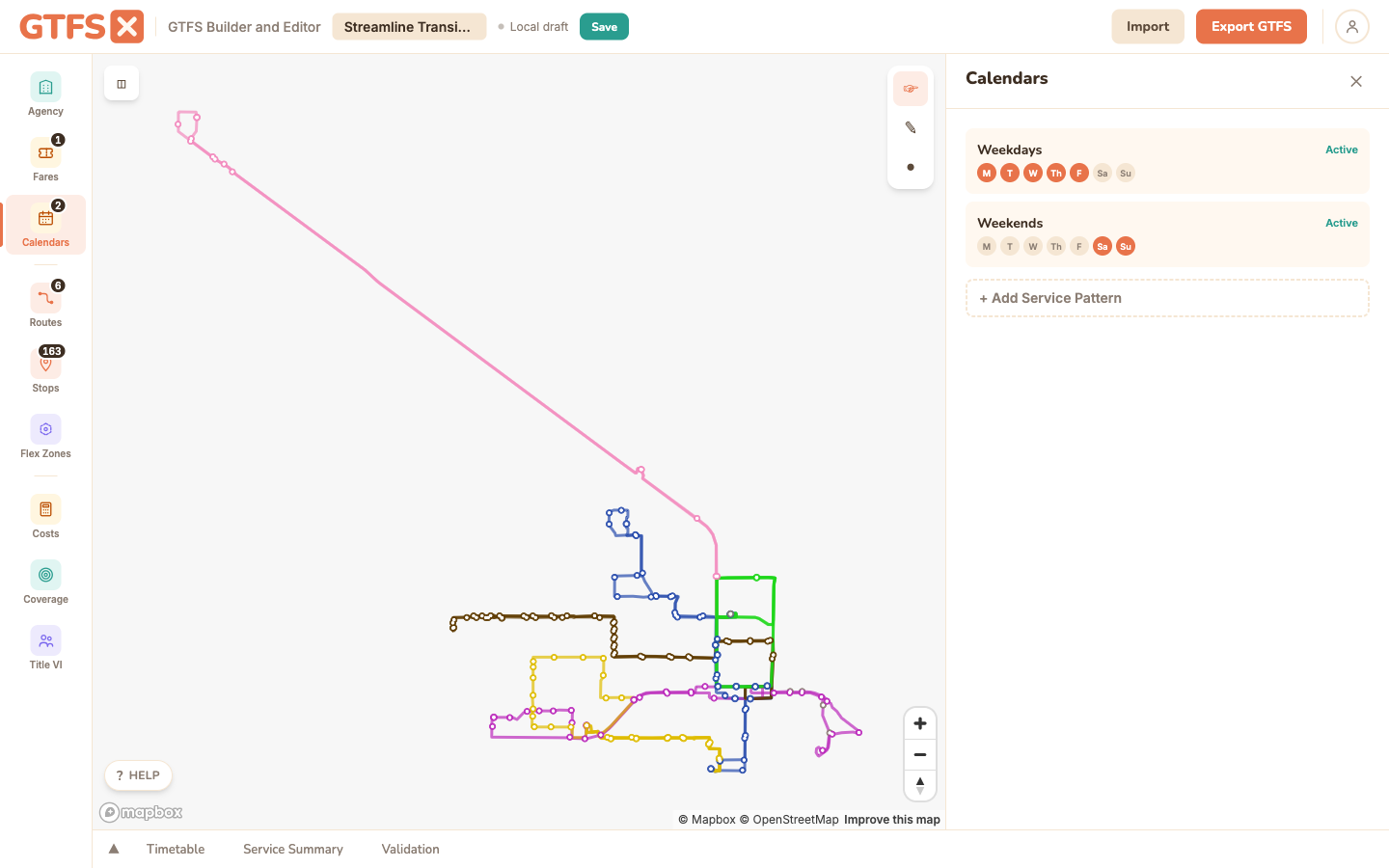
Weekly patterns
Each row in calendar.txt is a service pattern with a service_id, a date range, and seven day-of-week toggles. In the editor, click Add Service, give it a service_id (use a stable name like WKDY, SAT, SUN — these get embedded in trip records and rider URLs), set the start and end dates, and toggle which days the service runs.
Typical patterns:
- Weekday — Mon–Fri checked, Sat/Sun off.
- Saturday — Sat only.
- Sunday and major holidays — Sun only. Add the holidays via exception dates (below).
- Limited holiday service — used by some agencies for Thanksgiving / Christmas Day when even Sunday service doesn't run. None of the seven day toggles checked; the service runs only on dates that are explicitly added via
calendar_dates.txt(see "Exception-only services" below).
Date ranges should bracket the live period of your schedule. A feed with stale end_dates gets flagged by validators and rejected by some catalogs. Re-publish with refreshed dates when the schedule pickup happens.
Holiday exceptions
Click into a service pattern and open its Exceptions subpanel. An exception is a single calendar date that overrides the weekly pattern. GTFS distinguishes two kinds, both shown in the exception list with a badge:
- No Service (
exception_type=2) — service does not run on this date even though the weekly pattern says it would. The everyday case: "no Weekday service on Christmas Day," added to the Weekday pattern. - Added (
exception_type=1) — service runs on a date the weekly pattern would skip, e.g. a one-off added trip set. (Added exceptions round-trip on import and display in the list and month preview; the editor's add controls below create No-Service exceptions, which is what holiday handling almost always needs.)
If a weekday pattern has no exceptions at all, GTFS·X shows a gentle nudge in this subpanel — "Consider adding holiday exceptions — transit typically doesn't run on major holidays" — because a feed that runs full weekday service straight through Christmas is almost always a mistake.
Two ways to add them:
- One date — pick a date and click Add; it's recorded as a No-Service exception.
- US holidays — the Add US holidays picker is a checkbox grid of the eleven US federal holidays (New Year's Day, MLK Day, Presidents' Day, Memorial Day, Juneteenth, Independence Day, Labor Day, Columbus Day, Veterans Day, Thanksgiving, Christmas Day) with Select all / None. Tick the ones your agency closes for and click Add selected holidays — only the dates that fall inside this calendar's date range are added (the button tells you how many), each as a No-Service exception.
To remove an exception, click the × next to it in the list, or click its highlighted day in the month preview and confirm. To clear the whole list at once, use Delete all in the Exceptions header — it asks for a second confirmation ("Delete all N? Yes / Cancel") before removing every calendar_dates exception for that service. If your policy is "run Sunday service on the holiday" instead of closing, add the holiday as a No-Service exception on the Weekday pattern and leave the Sunday pattern running that date.
Exception-only services
For one-off events (a parade route, a holiday shuttle, an emergency replacement schedule) that don't follow a weekly pattern, create a service with all seven day toggles off. Then add explicit "service added" exception dates for the dates the service runs. The pattern is fully driven by calendar_dates.txt — no weekly rule at all. Valid GTFS, supported by most consumers.
When to split a calendar
A common modeling question: when does a service variation deserve its own service pattern vs. being squeezed into an existing one with exceptions?
- Same days, same trips, occasional skip → one service pattern, exception removes.
- Different trip set on certain days (e.g. summer schedule, reduced winter schedule) → separate service patterns with different date ranges.
- School-year vs. summer → two distinct service patterns, usually with non-overlapping date ranges.
- Snow-day backup schedule → often modeled as a separate service that's triggered manually rather than scheduled in advance. Some agencies leave this out of the static GTFS entirely and surface it through GTFS-Realtime alerts.
Edge cases and gotchas
- Service IDs are referenced everywhere. Trips, frequencies, fare rules, and Flex zones all point to a
service_id. Renaming or deleting a service cascades; the editor handles the references but external scripts that hardcode service IDs will break. - Date format is
YYYYMMDD(no dashes) in the underlying CSV. The editor presents a date picker; if you hand-edit, mind the format. - Overlapping service patterns are valid but confusing. A trip can reference only one service pattern. If "weekday" and "Friday-only" overlap on the same date, every trip needs to belong to exactly one, not both.
- Don't leave stale services around after a pickup. When the schedule changes, retire the old service patterns (let their end_date pass and clean them out at the next refresh) rather than just bumping the end_date forward — old trips can still reference them and confuse downstream consumers.
See also
- Timetables & trips — every trip references a service_id from here.
- Agency setup — the timezone in agency.txt defines how these calendar dates are interpreted.
- Validation — the validator flags stale date ranges and orphan service IDs.